Research Support
Information for researchers that is useful at various stages of a research project – from the initial idea to the dissemination of research findings.
Find out more about RSU Library Digital ExhibitionThe most important publications published on the RSU Research Portal in September 2026
The most important publications published on the RSU Research Portal in October 2026
Find information and data
- Resources
What to do if there are problems accessing subscribed e-resources!
Rīga Stradiņš University Library Electronic Catalogue
RSU academic staff publications and Doctoral theses database
RSU defended Bachelor's and Master's theses database
Medical and healthcare analytics database
Digitalized RSU doctoral theses – Instructions for accessing doctoral theses within the Institutional open access e-resource repository (DSpace)
- Search tools and techniques
PRIMO is a search tool, that allows you simultaneously search for information in:
- Union catalogue,
- RSU subscribed online databases,
- Databases created by the Library.
Too many or few results?
Databases and search engines often offer additional ways to search for better results: a good balance between completeness and relevance.
- Thesaurus. Thesaurus (dictionary) is the best place to look for them. PubMed MeSH
- Subject Headings. In various databases, subject headings are assigned to publications. These concisely describe what the publication is about. The subject headings make it possible to search for a topic.
- Fillers. Fillers are words that are common, but not important for a search. Examples of these are determiners and prepositions.
- Combining search terms. Combining multiple topics in one search can be done with Boolean operators.
The main Boolean operators are AND, OR and NOT:
AND --> All specified terms must appear in the search result.
OR --> One, or both, of the specified terms must appear in the search result.
NOT --> The specified term must not appear in the search result.- Nesting terms. With more complex searches, it can be efficient to nest search terms using brackets. Example: pneumonia AND (asthma OR cystic fibrosis)
- Wildcard symbols. Wildcard symbol broadens a search by finding words that start with the same letters. Use it with distinctive word stems to retrieve variations of a term with less typing.
Examples:
psychol * = psychology, psychological, psychologist
environ * = environment, environments, environmental
wom? n = woman, women- Phrase searching. Double quotes around a phrase ("...") indicate that the specified search terms must be side by side in this exact order.
- Proximity operators (NEAR, NEXT, ADJ). In some databases, the distance (the number of words) between two search terms can be chosen, so that variations of compound terms are also found.
- Search fields. Advanced search is designed to search in fields, such as title words, or author name. By using multiple search fields at the same time, the search results are lesser but more relevant.
Additional resources:Search techniques. Karolinska Institutet. University Library.
Science Direct tutorial: Performing an advanced search
Wiley online library - advanced search (Video)
PubMed User Guide
- Data search
To find research data that is useful to you, you need to make sure that your search is as efficient as possible. This 3-step strategy will make the data search process easier:
1. Identifying the purpose.
- What information should be reflected in the dataset for it to be useful? To narrow down your search, use keywords that indicate the spatial, temporal, and content coverage of the data, or any methodological information.
- What file formats would be most appropriate? If you plan to analyze the data using specialized software, make sure you know the appropriate file formats.
- What license would be most appropriate? If you plan to use the research results for commercial purposes, choose datasets that are not restricted by the license granted.
2. Search.
Datasets can be searched in data search engines, such as Google Datasetsearch or OpenAIRE Explore, or in specific repositories. To find a repository that potentially holds data that meets the search criteria, you can use repository registries such as re3data.org, FAIRsharing, and OpenAIRE Explore.
Data repositories are divided into industry-specific, general or multidisciplinary, institutional, or national.
DataverseLV is the Latvian National Research Data Repository. It is CoreTrustSeal certified, which confirms that the repository meets strict requirements for data management, technological infrastructure, and security.
Rīga Stradiņš University also has two institutional data repositories:
- RSU Dataverse - a data repository created for the deposit of university research data. It is registered with re3data.org, OpenAIRE and EOSC.
- RSU Dspace - an open access e-resource repository, which stores the results of RSU staff's scientific and academic activities, didactic and informational materials, doctoral theses and student final theses.
General data repositories:
- Latvian Open Data Portal - open data of the State Administration of Latvia.
- Official Statistics Portal - data of the Central Statistical Office.
- Mendeley Data
- UNdata - United Nations statistical data access system with global indicators in various sectors.
- Eurostat - Statistical Office of the European Union with comparable data on countries and regions.
- Zenodo
- Figshare
- Dryad
Industry-specific data repositories:
- Garamantas.lv - Digital archive of the Latvian folklore repository.
- Latvijas Banka Internet Statistics Database - Latvijas Banka database.
- WHO Global Health Observatory - World Health Organization global health data and statistics.
- World Bank Data - World Bank data on living standards and development indicators worldwide.
- NOMAD - Repository for computational materials science, which indexes data from modeling programs.
- Cambridge Structural Database - Repository for molecular crystal structures.
- DataMed - A prototype biomedical data search engine that searches for datasets in specific data repositories and sources (list).
- GenBank is the National Institutes of Health genetic sequence database, an annotated collection of all publicly available DNA sequences.
3. Evaluation.
In order not to waste time trying to analyze data that does not meet your needs, it is necessary to evaluate the relevance of the found dataset to the established goals and its quality:
- Look at the metadata assigned to the dataset and make sure that it meets the previously set criteria.
- If the dataset is accompanied by descriptive documentation (ReadMe file and/or codebook), familiarize yourself with the information provided therein about the content of the dataset.
- Consider the reliability of the data and the data source, evaluating their author and the information provided about the collection, processing and analysis methods.
- Systematic review
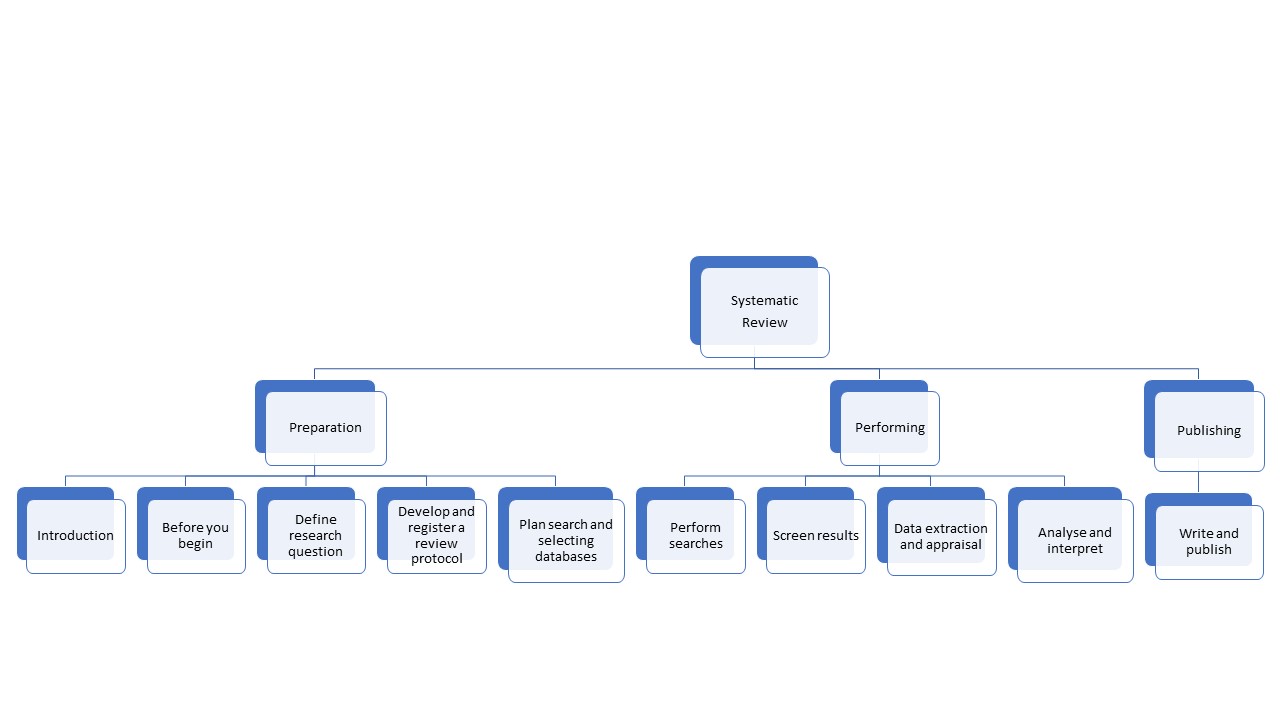
A systematic review is a review of a clearly formulated question that uses systematic and reproducible methods to identify, select and critically appraise all relevant research, and to collect and analyse data from the studies that are included in the review.
Click on the following diagram to learn more about systematic reviews ⇒
Manage data and information
- Plagiarism, references and citation styles
Plagiarism - the process or practice of using another person's ideas or work and pretending that it is your own (Cambridge dictionary).
Some examples of plagiarism:
- Copying large pieces of text from a source without citing that source.
- Taking passages from multiple sources, piecing them together, and turning in the work as your own.
- Copying from a source but changing a few words and phrases to disguise plagiarism.
- Turning in someone else's work as your own.
How to avoid plagiarism:
It's important to remember that plagiarism can be both intentional and unintentional. However, unintentional plagiarism carries the same consequences. There are steps you can take to avoid plagiarizing unintentionally:
- Quoting. Quoting means copying a piece of text word-for-word. The copied text must be introduced in your own words, enclosed in quotation marks, and correctly attributed to the original author
- Paraphrasing. Paraphrasing means using your own words to explain something from a source. It allows you to give only the most important information from a passage.
- Crediting and keep track of your sources. Credit the original author in an in-text citation and reference list. While you’re doing research and taking notes for your paper, make sure to record the source of each piece of information. One way that students commit plagiarism is by simply forgetting where an idea came from and unintentionally presenting it as their own.
- Express your opinions and ideas. Critical thinking is crucial point of your research strategy, so it is important to express your ideas, which are formulated during your research.
Plagramme.com is the plagiarism checker where users can get plagiarism scores free and in seconds.
- EndNote - citation manager
A citation manager helps you keep track of articles and books as you find them, tag and annotate them, and easily create citations and bibliographies in Microsoft Word, Google Docs, or other writing software. Using any citation manager will be more efficient than not using one at all.
In case of inqueries, please contact Inga[pnkts]Znotina
 rsu[pnkts]lv
EndNote offers more than 6,000 bibliographic styles for downloading
EndNote is the industry standard software tool for publishing and managing bibliographies, citations and references. There are different versions available:
- EndNote Basic is a free limited web version with 21 styles and a limited number of filters and connection files. This version is available to everyone. 50,000 references and 2 GB attachments are allowed.
- EndNote Basic (Web of Science version) is a limited web version available to RSU faculty, students, and staff as part of the RSU Web of Science subscription. As with the free version of EndNote Basic, a maximum of 50,000 references and 2 GB of attachments are allowed. In addition, the EndNote Basic Web of Science version has more than 4,000 styles and hundreds of filters and connection files.
- EndNote Desktop is a standalone, complete PC software package for a fee.
EndNote installation and user instructions
- Mendeley - reference manager
Mendeley Reference Manager
“Mendeley” is a free reference manager that can help you store, organize, note, share, cite references and research data. All versions and extensions are available to everyone. 2 GB attachments are allowed. “Mendeley” provides access to nearly 7000 citation styles.
Because “Mendeley” is an ELSEVIER product, you can sign up with an ELSEVIER account, the same one that uses to connect to “Scopus” and “Science Direct”, to make it easier to add and cite references. But you can also create a new account on the “Mendeley” website.
Mendeley Desktop is the downloaded part of the software installed onto your computer. Available for “Windows”, “MacOS” and “Linux”. From 1 September 2022, users will no longer be able to download and install “Mendeley Desktop” software. Existing users of “Mendeley Desktop” will continue to be able to sign into, use and sync their “Mendeley Desktop”.
Mendeley Web Importer is an extension for web browsers which helps you to add references to your library with full text PDFs. It is available in all web browsers. To add the extension to the “Opera” browser, use the “Chrome Web Store” link.
Mendeley Cite add-in for “Microsoft Word” allows you to easily insert references from your “Mendeley” library into your “Word” document, change your citation style and generate a bibliography - all without leaving your document.
The most convenient way to search and export references is in the “Mendeley” search engine itself. All you have to do is press “Add to library”. Various filters are available to select the one you want. Also, easy to export references are from “Scopus” and “Science Direct”, as these are ELSEVIER products.
When you start working with “Mendeley”, they have a 2021 “Quick User Guide” on their website, with pictures and explanations that are very useful, especially if you haven't worked with reference tools before, because the basics are similar to “EndNote”.
There are also “Help Guides” on the “Mendeley” website, which provide brief instructions on how and what to do with the “Mendeley Reference Manager” and extensions.
- Data management
Research data management is an important component of research. It helps to organize the research process, ensures its transparency and increases the impact of research results. High-quality research data management allows for the validation and replication of research, as well as promotes the reuse of data in new studies.
At Rīga Stradiņš University, research data management is determined by the RSU Research Data Management Procedure.
The University has a Data Stewards Team that provides methodological and practical support at all stages of the research data life cycle – from research planning to long-term data preservation.
Publish information and data
- Strategic publishing
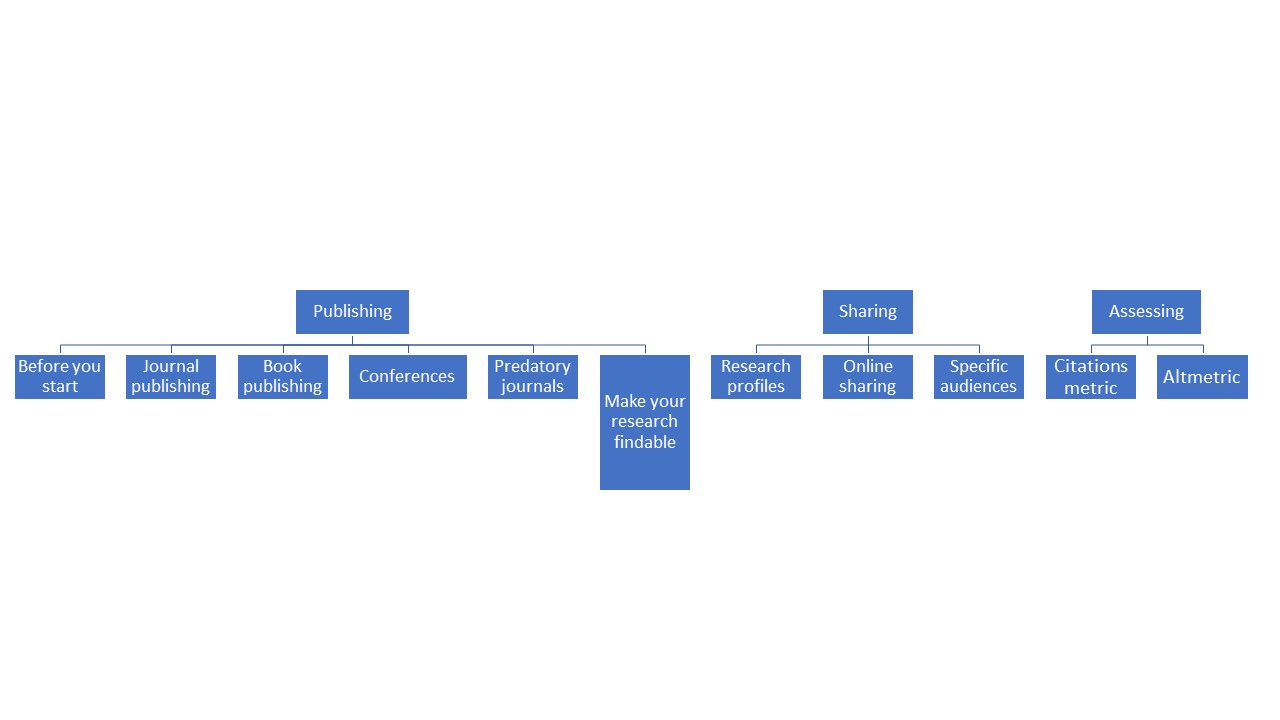
Strategic publishing means developing a clear plan to ensure you are reaching your target audience and supporting your career goals.
Maximise the impact of your research by having a well-informed plan for:
- Where to publish.
- Sharing your research after publication.
- Evaluating whether or not your strategy was successful.
This resource helps you to focus on key decisions in the publishing lifecycle that increase the potential for your research to gain attention and engagement.
Publish or Perish: Graduate Students' Guide to Publishing.
SAGE guide: How to get your journal article published.
SAGE webinars: How to get published.
Click here to learn more about the steps of strategic publishing ⇒
- Open access
Open access means making your research available online, free of cost or other barriers to access. Open access provides an opportunity to achieve the widest communication of your research, maximising the reach and impact of your work. Open access publication is a vital issue for the development and transparency of research.
All types of research outputs can be made open access, including journal articles, reports, theses, books, research data and "non-traditional" research outputs, including creative works.
Most academic funders require the open international publication of research results. However, publishing in open access publications is not necessarily free of charge. Researchers often have to pay author fees for open access publications, and separate funding is typically not provided to cover these fees.
The benefits of publishing your research open access include:
- Increased citation and use of journal articles when compared to articles available only by subscription, i.e. behind a "paywall";
- Greater public engagement as your research can be accessed by anyone (The University of Sydney Library).
Types of open access publishing and archiving for journal articles:
Gold open access – publishing your article in an open access journal. Your article will be immediately openly available on the publisher's website upon publication. Publishing in an open access journal will usually incur an Article Processing Charge (APC).
Green open access – making a copy of your accepted manuscript (post-print) available in an open access repository (self-archiving). There is no charge to archive/deposit a work in an open access repository. The publisher's version of the article will only be accessible to subscribers.
Hybrid open access – making individual articles open access immediately upon publication after payment of an APC, while other articles in the journal remain available only to subscribers. Journals offering hybrid open access may also offer an option for self-archiving (green open access)(The University of Sydney Library).
Open science refers to the mechanisms by which the findability, accessibility and use of scientific knowledge is promoted in the digital era.
This encompasses open research outcomes, including:
- Publications;
- Research data;
- Research methods;
- Open source code.
In addition to the above, open science refers to:
- Open research infrastructures;
- Research-based open learning material;
- Inclusive research processes such as citizen science (University of Helsinki).
Open science contributes to the reliability and self-correction of science. Open access to research-based knowledge is also key for the societal and global impact of universities.
OpenAIRE is a European project supporting Open Science. It is an network of dedicated Open Science experts promoting and providing training on Open Science.
Open Science: Empowering Knowledge (Elsevier) - Infographics
Wiley. Open access options for your article.
eLife works to improve research communication through open science and open technology innovation.
The Goethe-Institut offers access to Open Access content - 3 million scientific publications included in the common list of all German research libraries (GVI). These include books, articles, dissertations, as well as newspaper and magazine articles in various languages (mainly German and English).
- Copyright
Copyright shall belong to the author as soon as a work is created, regardless of whether it has been completed. It shall apply to works of literature, science, art, and other works, also unfinished works, regardless of the purpose of the work and the value, form or type of expression. Proof of copyright ownership shall not require registration, special documentation for the work or conformity with any other formalities.
You can choose an open licence to maintain your copyright while enabling the public to use and remix your creative work. An open licence grants permissions and states restrictions; the specific permissions granted depend on the type of open licence you choose.
Resources:
Communication
- Researcher profile
ORCID provides a persistent digital identifier (an ORCID iD) that you own and control, and that distinguishes you from every other researcher. It is possible to add professional information to the ORCID iD - the researcher's membership in the organization or organizations, scholarships, publications, etc. ORCID iD can be used to share your professional information in other systems and databases by adding it to the author's information.
- Academic social networks
Academic social networks such as Academia.edu and ResearchGate are becoming very popular among academics. These sites allow uploading academic articles, abstracts, and links to published articles; track demand for published articles, and engage in professional interaction.
- ResearchGate is the professional network for scientists and researchers. Over 20 million members from all over the world use it to share, discover, and discuss research. We're guided by our mission to connect the world of science and make research open to all.
- Google Scholar Many researchers use Google Scholar to help establish their scholarly credentials. Creating a Google Scholar Profile can help you raise your visibility as a scholar and make sure you’re getting credit for all of your publications. The resource helps authors decide where to publish - for example, an author can browse top journals in a variety of industries, sorted by their h-index and h-median over the past 5 years.
- Academia is a platform designed to share academic research. The platform is already used by 150 million users and contains 22 million studies. Supports open access. In addition to subscribing to Academia Premium, researchers have access to more detailed information, such as authors with advanced publication analysis and impact tracking tools.
- Penprofile is an academic social networking that fosters global (social) interactions among academics/scholars, students and educational organizations with a view to causing enormous diffusion of knowledge growth and development. It has robust inbuilt features/sections such as profile creation for individual and organization, a unique article/blogging platform, group creation, research reviews, academic news such as job placements, writing opportunities, call for papers, conferences, and a lot more membership opportunities.
- Mendeley is a free citation management software program that lets you store and organize references. It also has academic social networking features.
Social media for researchers: Elsevier Researcher academy (Presentation)
- PubLons
In today's highly competitive research environment, researchers are often asked to make their impact visible. Web of Science has made it possible for researchers to quickly and easily track and demonstrate their impact as authors, journal editors, and peer reviewers, in one place.
Use Publons to track your publications, citation metrics, peer reviews, and journal editing work in a single, easy-to-maintain profile.
- All your publications, instantly imported from Web of Science, ORCID, or your bibliographic reference manager (e.g. EndNote or Mendeley).
- Trusted citation metrics, automatically imported from the Web of Science.
- Your verified peer review and journal editing history, powered by partnerships with thousands of scholarly journals.
- Downloadable record summarizing your scholarly impact as an author, editor and peer reviewer.
Resources:
Measure impact
- Citation metrics
Citation metrics are used to help determine the relative quality and impact of a single article or the research output of an individual, group or institution using citation counts.
Citation metrics include:
- Citation Rate.
- Citations Received Per Year.
- Mean Citation Rate.
- Median Citation Rate.
Author-level metrics
- H-index is a metric calculated using publication and citation rates and can help determine relative quality of an author's work based on both productivity and impact. H-index calculation tools are Web of Science, Scopus and Google Scholar.
- G-index is introduced as an improvement of the h-index of Hirsch to measure the global citation performance of a set of articles.
- i10-index is the number of publications with at least 10 citations. It was introduced by Google in July 2011 as part of Google Scholar.
Journal-level metrics – Journal Citation Report, Eigenfactor, SJR.
Article-Level Metrics – Google Scholar, Scopus, Web of Science, SNIP.
- SCiVal
SciVal offers quick, easy access to the research performance of 4,600 institutions and 220 countries. Can navigate the world of research and devise an optimal plan to drive and analyze your performance. A great tool for benchmarking your progress and looking at collaborative partnerships. Uses the Scopus Dataset for its analysis.
SciVal contains:
- 23,500+ peer-reviewed journals
- 300+ industry publications
- 194,000+ books
- 740+ book series
- 9+ million conference papers
SciVal analytical tool offers to evaluate authors, institutions, research groups by number of publications, influencing factors, number of views and other bibliographic data. The tool allows to objectively compare the publications of Latvian authors with similar publications of authors from other countries. SciVal requires individual registration, indicating the RSU data.
SciVal Consists of:
- Overview. Provides overview data for up to 9,000 institutions for time periods 2012-2016.
- Benchmarking. Enables you to benchmark multiple institutions for any time period, dating back to 1996.
- Collaboration. Shows the collaborating institutions in addition to the individual authors and papers.
- Trends. Enables you to explore specific topics and investigate universities and authors publishing in that topic.
SciVal offers a wide range of simple and sophisticated metrics, including Snowball metrics, which have been identified in collaboration with academia and industry to ensure that they are used safely and appropriately in strategic decision-making and benchmarking.
Metrics in SciVal - what are they and what are their strengths and weaknesses?
- Altmetrics
Altmetrics, or alternative metrics, capture a range of activity to measure engagement and attention from audiences beyond academia. Like citation metrics, altmetrics have limitations and should be used as a complement to other indicators.
Benefits of Altmetrics:
- Capture elements of societal impact. Altmetrics data can inform researchers of elements of the societal impact of their research. For example, altmetrics data can help researchers understand how their research is being interacted with by the public, government, policy makers, and other researchers.
- Complement traditional metrics. Altmetrics provide a wider range of data, from a wider range of sources than traditional metrics. Altmetrics data is also highly nuanced and can be provided in high detail and in the context in which it originates.
- Offer speed and discoverability. Altmetrics data accumulates at a faster speed compared to traditional metrics. In disciplines where citations grow slowly, or in the context of new researchers, this speed helps determine which outputs are gaining online attention.
- Open access advantage. Providers like Altmetric.com and ImpactStory provide access to their API and source code. Altmetrics providers also pull their data from open sources, who give access to their APIs or raw usage data, which makes altmetrics data more easily replicable than data in proprietary databases.
Considerations for Altmetrics
Altmetrics offer a lot of information. Here are some considerations to keep in mind when using and analyzing altmetrics data.
- Altmetrics lack a standard definition. The field of altmetrics remains undecided on what altmetrics truly measure. However, the NISO Alternative Assessment Metrics (Altmetrics) Initiative is currently working to create a standard definition of the term and has a draft of its definition open for public comment.
- Altmetrics data are not normalized. It is not advised to compare between sources and data sets for altmetrics, as different providers collect different kinds of data. Instead, we suggest using altmetrics to tell a story about your research - see the "Use Cases" tab for more information.
- Almetrics are time-dependent. Altmetrics provide information about the use of the work, but much of this use has a lifespan - and that lifespan is unknown. For older works, there may not be much altmetrics activity, but that does not necessarily mean that the work is not heavily used!
- Altmetrics have known tracking issues. Altmetrics work best with items that have a Digital Object Identifier (DOI). PlumX is one provider that can track usage of an item with only a URL, but not all providers provide the same level of tracking for items without DOIs.
What can Altmetrics do for me?
- Explore the impact of your research beyond “traditional” journal-level metrics. See how different audiences—from fellow researchers to middle school students—are engaging with your scholarship on the open web.
- Show funders the broad reach of an article that was produced from your grant research.
- Manage your scholarly reputation. Keep abreast of who is talking about your research and what they are saying. Include altmetrics on your CV and professional website.
- Compare your work to others in your field. Discover what articles at Pitt and other institutions are getting the most attention and work to improve the reach of your own work.
PLOS has been a leader in providing altmetrics. Each article they publish has a "Metrics" section that provides a lot of information. RSU subscribed databases: Science Direct; Scopus, ProQuest Ebook Central, SAGE publications, BMJ journals, Wiley online Library, The Cochrane Library.
Altmetrics can answer following questions:
- How many times has the document been downloaded?
- Who reads my work? (Mendeley, bookmarking sites, etc.)
- Was it covered by a news agency?
- Do other researchers comment on this?
- How many times has it been shared? (Facebook, Twitter, etc.)
- In which countries do I search / view / read my research?
Articles by Item Type:
- Citations: Scopus, Web of Science, PubMed Central, and Google Scholar citations; citations in policy documents.
- Bookmarks: scholarly bookmarks on Mendeley & CiteULike; bookmarks by the public on Delicious & Pinboard; Twitter favorites.
- Discussion: peer reviews on F1000, Publons, and other post-publication peer review websites; Twitter mentions and Facebook wall posts; newspaper articles, videos, and podcasts; mentions on scholarly blog networks like ResearchBlogging.
- Shares: Twitter mentions, Facebook shares.
- Views: Pageview & download statistics from the journal website or repository where you've archived your paper
(Careless, J. 2013. Altmetrics 101: A Primer. (cover story). Information Today, 30(2), 1-36.)
Altmetric, Plum Analytics, Impactstory.
(Introduction to altmetrics. LibGiude. University of Pittsburgh)
Resources:
Williams, A. E. 2017. Altmetrics: an overview and evaluation. Online Information Review, 41(3), 311-317.
Barnes, C. (2015). The Use of Altmetrics as a Tool for Measuring Research Impact. Australian Academic & Research Libraries, 46(2), 121-134.